









Sparkfun MC Etcher - Diamond Drag Bit (Combo Pack)
Description
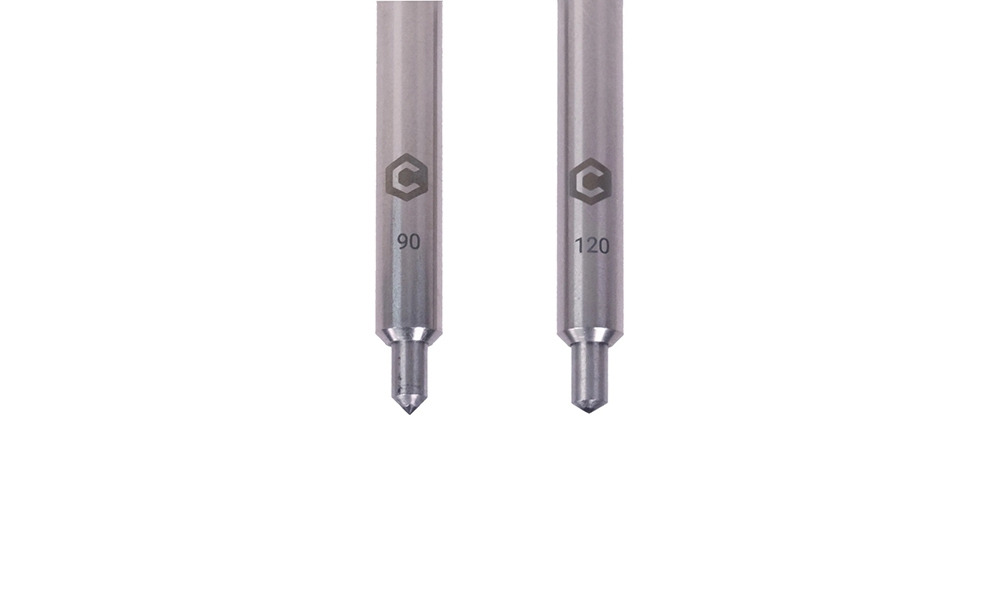
The MC Etcher is versatile in its application, making it suitable for artists, hobbyists, and professionals alike. Whether you're crafting intricate designs on anodized metals or engraving detailed patterns on glass, this tool delivers exceptional results. With two tip options, the 90-degree tip excels at penetrating harder materials, while the 120-degree tip is ideal for creating wider lines on softer surfaces like fiberboard.
One of the standout features of this tool is its adaptability to different materials. From plastics like acrylic and polycarbonate to metals such as aluminum and stainless steel, the MC Etcher handles them all with finesse. It even works on glass, porcelain, ceramics, and stone tiles like granite and marble. However, be mindful that harder materials may cause more wear, so it's wise to test for the optimal toolpath density to prolong the tool's lifespan.
Generating toolpaths for the MC Etcher is straightforward. Utilize software like Carbide Create to craft contour and pocket toolpaths with a zero RPM setting. Alternatively, Carbide Create Pro offers the Engrave toolpath feature for both outline and fill toolpaths. For optimal performance, a starting feed rate of 152 cm/min and a plunge rate of 76 cm/min are recommended, with a cut depth of 0.38 mm.
Properties

Delivered in 5 to 7 days
 Sparkfun MC Etcher - Diamond Drag Bit (Combo Pack) Delivered in 5 to 7 days € 104,10
 Customer questions
Customer Reviews
- Reduced In stock -50 % Sparkfun Screw Terminals 5mm Pitch (2-Pin) € 1,60 € 0,80 View product
- Reduced In stock -49 % Sparkfun LED - Ultraviolet € 2,15 € 1,10 View product
- Reduced In stock -50 % Sparkfun Diffused LED - Yellow 10mm € 1,10 € 0,55 View product
- Reduced In stock -51 % Sparkfun Battery Holder 2xAA with Cover and Switch € 2,55 € 1,25 View product
- Reduced In stock -50 % Sparkfun Barrel Jack Power Switch - M-F (3") € 5,05 € 2,55 View product
- Reduced In stock -50 % Sparkfun Interface Cable - SMA Female to SMA Male (25cm) € 7,90 € 3,95 View product
- Reduced In stock -50 % Sparkfun Diode Rectifier - 1A, 50V (1N4001) € 0,40 € 0,20 View product
- Reduced In stock -49 % Sparkfun Servo to Alligator Clip Cable - Shrouded € 3,25 € 1,65 View product
- Reduced In stock -48 % Sparkfun Screw Terminals 5mm Pitch (3-Pin) € 1,65 € 0,85 View product
- Reduced In stock -50 % Sparkfun Latch Terminals - 5mm Pitch (2-Pin) € 2,30 € 1,15 View product
- Reduced In stock -49 % Sparkfun Teensy Header Kit € 3,25 € 1,65 View product
- Reduced In stock -51 % Sparkfun Mini Photocell € 2,55 € 1,25 View product
- Reduced In stock -48 % Sparkfun Electrolytic Decoupling Capacitors - 100uF/25V € 1,45 € 0,75 View product
- Reduced In stock -50 % Sparkfun Female Headers € 2,80 € 1,40 View product
- Reduced In stock -50 % SparkFun Voltage-Level Translator Breakout - TXB0104 € 8,55 € 4,30 View product
Recently viewed items